Our Offensive Security team conducted phishing simulation campaigns across multiple client organizations throughout the year. The results reveal uncomfortable truths about human vulnerability to social engineering—and why technical controls alone aren’t enough.
The Complete Funnel: From Send to Compromise
Here's the realistic progression of a phishing campaign across our simulations:
Stage 1: Campaign Launch
Baseline: 100 phishing emails sent across the organization
Stage 2: Email Opens
-
43% opened the email (realistic baseline: 32-54% of emails are opened)
-
57% never opened it — either filtered, ignored, or suspicious enough to avoid
-
This already demonstrates the challenge: nearly half your organization doesn't even see the threat
Stage 3: The Click Decision
Of those who opened the email:
-
56% clicked the link — more than half of those who engaged took the bait
-
44% stopped here — didn't click, showing some caution
Stage 4: Credential Entry
Of those who clicked the link:
-
~12.5% (3 out of 24 clickers) entered their credentials — direct account compromise
-
~68% (16 out of 24 clickers) clicked but didn't enter credentials — signaled vulnerability to attackers
-
~17% (4 out of 24 clickers) reported the phishing attempt — the defenders in the group
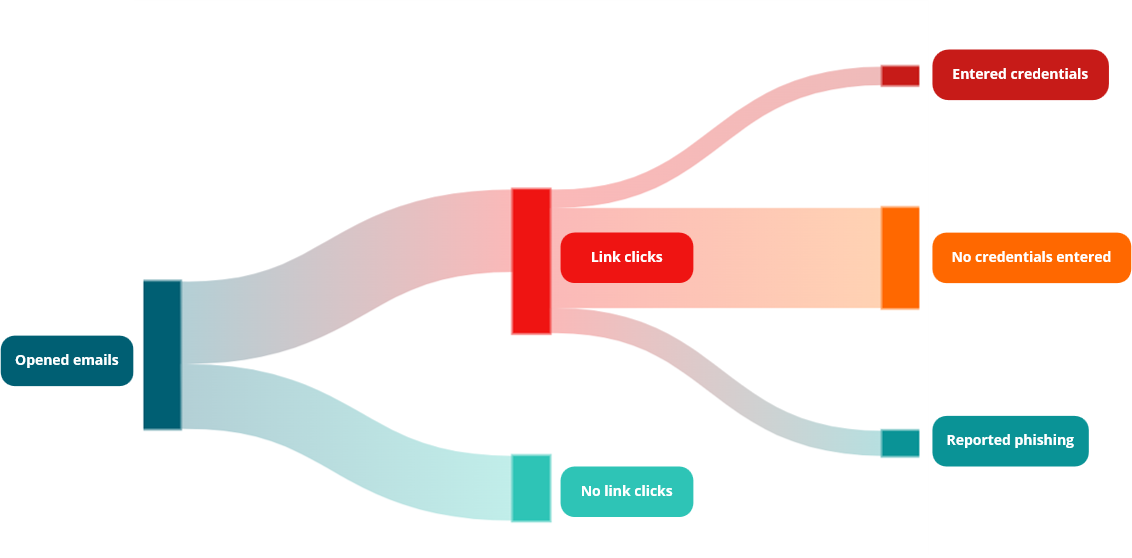
Image 01 - Funnel: From Send to Compromise
What These Numbers Really Mean
The Math of Compromise at Scale:
If your organization sent a phishing campaign to 1,000 employees:
-
430 open the email (43% baseline)
-
241 click the malicious link (56% of 430)
-
30 employees hand over their credentials (12.5% of clickers)
30 compromised accounts from a single campaign.
Now consider: If attackers run phishing campaigns quarterly, monthly, or continuously—and your organization doesn't have MFA deployed—that's 120+ compromised accounts per year, even accounting for overlap.
The 43% Open Rate is Your First Problem.
Many organizations assume phishing filtering eliminates most threats. The reality: 43% penetration means your email security is missing a significant percentage of attacks. This could indicate:
-
Advanced threat evasion techniques bypassing filters
-
Social engineering so convincing it passes technical checks
-
Compromised legitimate accounts used for phishing distribution
-
Targeted spear-phishing designed for specific high-value employees
The 56% Click Rate Among Those Who Opened is Your Second Problem.
Of those who engaged with the email:
-
More than half clicked the link
-
They've signaled to attackers: "I'm vulnerable"
-
They've potentially exposed their device to malware
-
They've been identified for future targeted attacks
A sophisticated attacker uses this data to profile and refine subsequent campaigns.
Three-Layer Defense Strategy
Layer 1: Technical Controls (Your Safety Net)
Even with a 43% open rate and 56% click rate, technical defenses can prevent compromise:
Multi-Factor Authentication (MFA): The single most effective control
-
Stolen credentials become useless without the second factor
-
Of those 30 compromised accounts (in our 1,000-employee example), zero lead to account takeover
-
Effect: Reduces account compromise by 99.9%
Email Filtering & Threat Detection:
-
Advanced threat protection catching phishing emails before they reach inboxes
-
Link rewriting and sandbox detonation of suspicious URLs
-
URL reputation checking and real-time threat intelligence
-
Current impact: Blocks ~57% of phishing (explaining why only 43% open)
-
Potential: Modern filters can increase this to 70-80%, but won't achieve 100%
Endpoint Protection & EDR:
-
EDR tools monitoring for credential-stealing malware
-
Malware detection when employees access phishing domains
-
Browser isolation for high-risk links
-
Session monitoring for suspicious authentication
-
Effect: Catches post-click compromise attempts
Layer 2: Human Layer (Continuous Education)
Technical controls fail without humans trained to identify and report threats.
Phishing Simulations (Regular & Frequent):
-
Frequency: Monthly to quarterly campaigns minimum
-
Realism: Match current attacker tactics (CEO impersonation, urgency, authority, business language)
-
Feedback: Immediate training after clicks, positioned as learning, not punishment
-
Tracking: Measure improvement over time (target: 56% click rate → 15-20% within 6 months)
Why it works: Repetition builds pattern recognition. Employees who see realistic simulations regularly become significantly less likely to click malicious links. Studies show 50-60% reduction in click rates with consistent training.
Security Awareness Training:
-
Beyond generic "don't click links" messaging
-
Teach specific threat indicators: sender address spoofing, urgency language, unusual requests, grammar errors, mismatched domains
-
Context-specific training: Finance employees get banking fraud scenarios; HR gets recruitment scams; Sales gets vendor impersonation
-
Effect: Moves employees from reactive (detecting after clicking) to proactive (avoiding clicks before engagement)
Reporting Culture & Incentives:
-
Make reporting effortless: one-click "Report Phishing" buttons in email clients
-
Recognize and celebrate employees who report threats
-
Monthly or quarterly: "Here's what got reported and blocked this month"
-
Remove fear: Explicit policy that reporting is never punished, even if the employee clicked first
Layer 3: Incident Response (When Prevention Fails)
Assume breach. Plan for the 3% who compromise credentials.
Immediate Detection & Response:
-
MFA alerts when compromised credentials are used
-
Immediate account lockdown on failed MFA attempts
-
Automated investigation of email forwarding rules, calendar sharing, send-as permissions
-
Credential reset and session termination
-
Monitoring for lateral movement from compromised account
-
Effect: Limits damage window from days to minutes
The Hard Truth
Even a well-trained, well-defended organization will experience phishing. Attackers are persistent and sophisticated. The question isn't if you'll be phished—it's when, and how quickly you'll detect and respond.
Industry benchmarks show the progression:
-
Untrained organizations: 43-54% email open rates, 45-60% click rates, 30-40% credential entry rates
-
Trained organizations: 32-40% email open rates, 15-25% click rates, 3-8% credential entry rates
-
Security-mature organizations: 25-35% email open rates, 5-15% click rates, <1% credential entry rates
Your gap: If you're at 43% opens and 56% clicks, you're in the untrained zone. Security-mature organizations are 10x+ better across these metrics.
Key Takeaway
Your 43% email open rate and 56% click rate aren't outliers—they're average for organizations without comprehensive security programs. But they're not acceptable for organizations with sensitive data, critical infrastructure, or regulatory obligations.
The best defense combines three elements in harmony:
-
Technical controls that make compromise futile (MFA, threat detection)
-
Humans trained to recognize and report threats (simulations, awareness)
-
A culture where security is everyone's responsibility (incentives, communication)
Organizations that excel at phishing resilience don't eliminate human error—they architect systems where human error doesn't lead to breach.
What's your organization's phishing metrics? Email open rates? Click rates? Have you measured them? Drop your experiences and lessons learned in the comments—let's build a community of defenders working together to raise the bar.